The most powerful tool for capturing the Arctic’s untamed spectacle isn’t a heavy tripod and a five thousand dollar lens; it’s the device already resting in your pocket. While many travelers still believe professional results require bulky gear, the 2026 generation of smartphone sensors has bridged the gap between amateur snapshots and gallery-quality art. Learning how to photograph the northern lights with a phone is no longer about compromise. It’s about understanding how to harness the pristine clarity of modern optics to mirror the child-like wonder you feel under a shimmering, emerald sky.
It’s disheartening to witness a celestial dance only to find your screen filled with grainy, blurry noise. We understand the frustration of a battery dying at 15 percent just as the sky turns violet, or the confusion of choosing between automated night settings and manual controls. This article provides a curated approach to mobile aurora photography, blending professional expertise with the latest software advancements. You’ll discover the precise settings to override, the essential gear to keep your device alive in the rugged cold, and the final word on whether Night Mode or Pro Mode delivers the most bespoke results for your journey.
Key Takeaways
- Unlock the potential of 2026 computational photography by mastering the “Golden Trio” of manual settings to capture the sky’s silent dance.
- Discover professional secrets on how to photograph the northern lights with a phone, ensuring every ethereal ribbon of light is preserved with crystalline clarity.
- Learn why a curated selection of gear—from stable tripods to seamless smartwatch integration—is essential for achieving sharp, professional-grade results in rugged environments.
- Elevate your visual storytelling by using foreground elements and the Rule of Thirds to add a sense of majestic scale to the untamed Arctic landscape.
- Refine your captures into bespoke masterpieces with advanced mobile editing techniques that preserve the natural, pristine beauty of the Nordic night.
The Evolution of Mobile Night Skies: Why Your Phone is Ready for the Aurora
The night sky isn’t a dark void anymore. For years, capturing the dancing ribbons of the North required heavy tripods and expensive glass. In 2026, the landscape has shifted. Your smartphone is no longer just a communication tool; it’s a sophisticated optical instrument capable of seeing what the human eye often misses. Learning how to photograph the northern lights with a phone has become the primary way travelers document their Arctic journeys. This shift isn’t accidental. It’s the result of a decade of engineering where sensors finally met the demands of the untamed night.
Understanding Low-Light Sensors in 2026
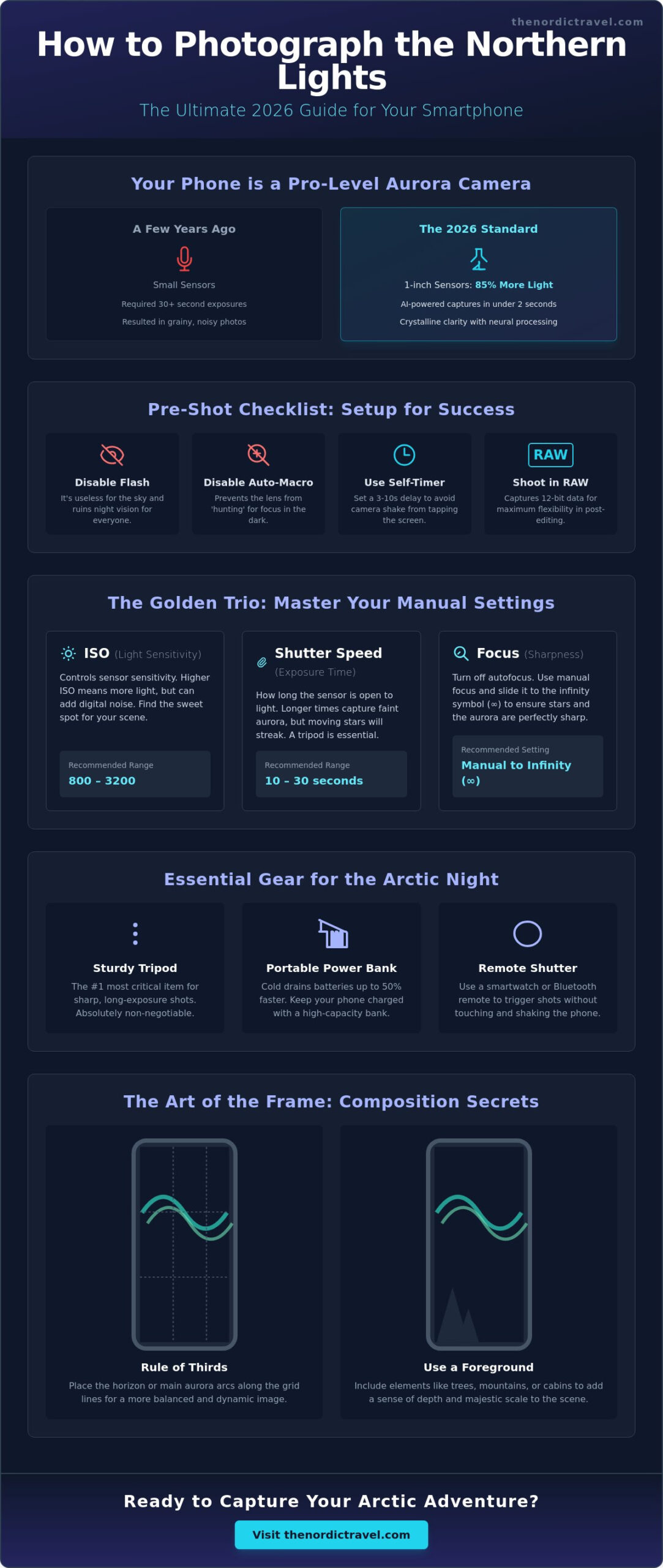
By 2026, flagship devices have standardized the 1-inch sensor, providing a surface area for light collection that was once reserved for professional mirrorless cameras. These larger sensors allow for an 85% increase in photon capture compared to models from just three years ago. Pixel binning is a process where multiple adjacent pixels combine their data into one “super-pixel” to drastically reduce digital grain in low-light environments. This means you can now rely on “Instant Capture” settings that process images in under two seconds, a stark contrast to the 30-second manual exposures required in the past. To truly appreciate the results, one must first understand the science of the aurora and how solar particles interact with our atmosphere to create these spectral displays.
The Magic of Neural Processing
The secret isn’t just in the glass; it’s in the silicon. Modern neural engines are trained on millions of celestial images to distinguish between digital noise and the soft glow of the magnetosphere. When you point your lens upward, the AI identifies specific wavelengths, automatically optimizing the deep purples and vibrant greens that define the experience of seeing the northern lights. While manual intervention is still a choice for enthusiasts, the 2026 “Night Mode” handles complex exposure stacking with bespoke precision.
You’ll notice a difference between your screen and your surroundings. Your phone’s sensor is more sensitive than your retina. You might see a faint, ghostly mist with your eyes, but your screen will reveal a vivid, ethereal dance of light. This curated technology ensures that your memories of the pristine North are as vivid as the moment itself. Capturing these moments is the ultimate way to master how to photograph the northern lights with a phone while remaining present in the silence of the Arctic night. The technology acts as a bridge, bringing the invisible beauty of the cosmos into a tangible, high-definition reality.
Mastering the Technical: Essential Phone Settings for the Aurora Borealis
The Arctic sky is an untamed canvas, but capturing its brilliance requires more than just pointing your device at the stars. To master how to photograph the northern lights with a phone, you must first silence the device’s automated instincts. Modern smartphones are designed for daylight; in the pristine darkness of the North, their default settings often fail. Start by disabling your flash. It’s useless against the cosmos and will only shatter the night vision of those around you. Next, turn off “Auto-Macro” or “Macro Control” in your camera settings. This prevents the lens from frantically searching for a subject in the dark, a process that often results in blurry, unusable frames.
The “Golden Trio” of manual photography determines the soul of your image. ISO controls your sensor’s sensitivity to light, while shutter speed dictates how long that sensor remains open to the ethereal glow. Focus is the final anchor. Shooting in RAW or ProRAW is non-negotiable for high-end results. Since its introduction in 2020, ProRAW has allowed mobile photographers to retain 12-bit data, providing the latitude needed to recover shadows and highlights during post-processing. Finally, always use a 3 or 10-second self-timer. Even the gentlest tap on the screen creates a micro-vibration that can ruin a long exposure, turning sharp stars into messy streaks.
The Manual Override: Pro Mode vs. Night Mode
Night Mode is a triumph of modern AI, but it often over-smooths the rugged textures of the sky. For a truly bespoke result, switch to Pro or Manual mode. Set your focus slider to “Infinity,” often represented by a mountain icon. This ensures the distant stars remain crisp points of light rather than soft, glowing orbs. Adjust your ISO to find the balance between light sensitivity and digital noise. On flagship phones released in 2025 and 2026, an ISO between 800 and 1600 typically provides a clean, professional finish without the graininess that plagues lower-end sensors.
Recommended Settings by Lighting Intensity
The aurora is a living, shifting entity. Your settings must adapt to its rhythm. If you’re witnessing a faint green glow on the horizon, use a 10 to 15-second exposure and a higher ISO to pull detail from the darkness. However, when the sky erupts into a “Dancing Corona,” you must change your strategy. A shorter shutter speed captures the sharp, distinct ribbons of light, preventing the aurora from becoming a blurry green wash.
- Faint Glow: 10-15 second exposure, ISO 1600-3200.
- Active Ribbons: 5-8 second exposure, ISO 800-1600.
- Dancing Corona: 2-5 second exposure, ISO 800.
Capturing these moments requires patience and the right environment. If you’re looking for the perfect backdrop for your photography, a tailor-made Arctic journey offers the seclusion and expert guidance needed to find the clearest skies. Using these manual controls ensures your memories are as vivid as the night you experienced them.
Beyond the Screen: Essential Gear and Cold-Weather Preparation
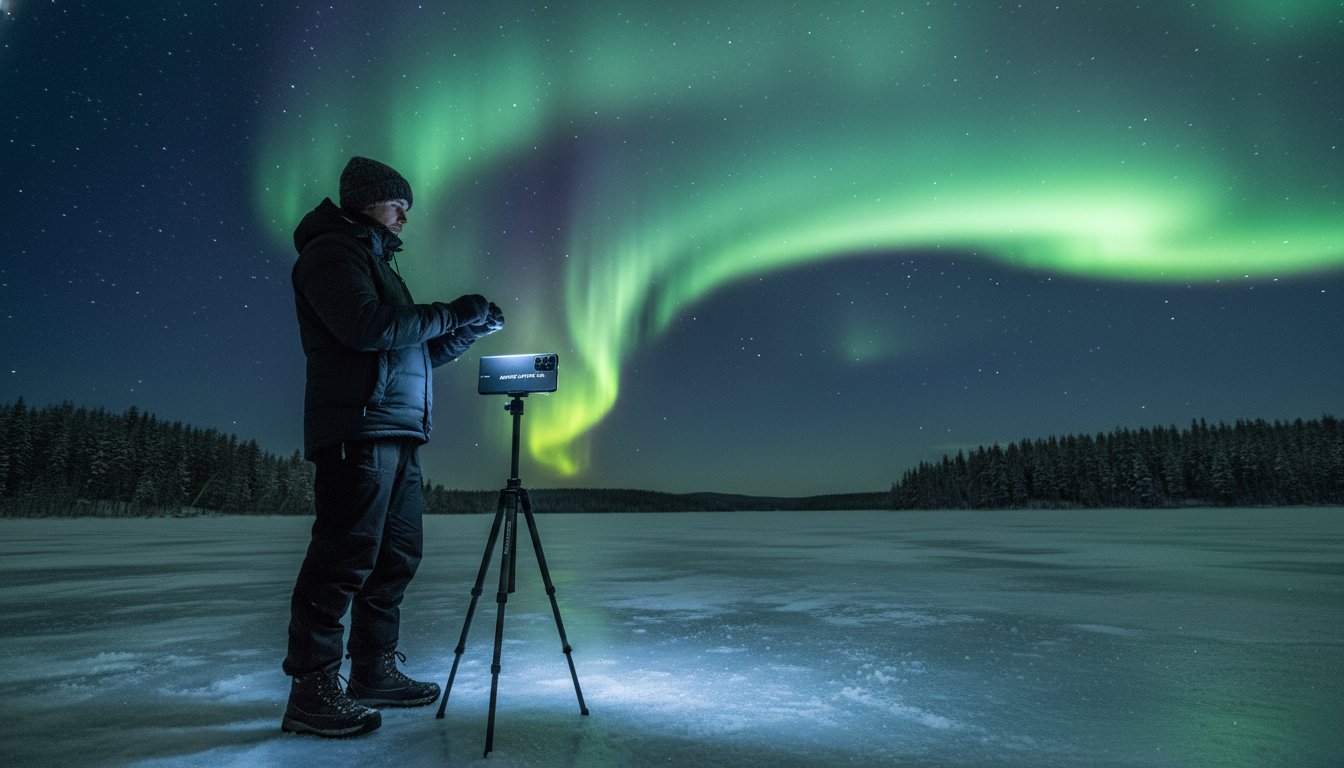
The Arctic night is a silent, demanding host. While your phone’s sensors have evolved significantly by 2026, the laws of physics remain unchanged in the face of the sub-zero wild. To master how to photograph the northern lights with a phone, you must look past the software and focus on the physical foundation of your shot. Stability is your first priority. Even the most advanced night modes require a steady frame for multi-second exposures. Handheld shots often lose the fine, curtain-like detail of the aurora, resulting in a muddy image. A remote shutter is your best ally here. Using an Apple Watch or a modern smartwatch allows you to trigger the shutter without touching the device. This eliminates micro-vibrations that could blur the dance of the lights across the pristine sky.
The Curated Mobile Photography Kit
Select gear that balances portability with the rugged demands of the Nordic terrain. A carbon fiber travel tripod is essential; it is lightweight for long treks but won’t freeze your skin like aluminum when handled in the cold. Magnetic mounting systems, such as MagSafe, have become the gold standard for 2026. They allow you to snap your phone onto the mount in seconds. This is a crucial feature when temperatures drop below -20 degrees Celsius and every moment of exposure counts. While external lenses were once a necessity, the native ultra-wide optics on flagship phones now capture the 120-degree field of view needed for the aurora with stunning clarity. Unless you seek a specific anamorphic flare, your built-in lenses are likely sufficient for this ethereal display.
Arctic Survival for Your Smartphone
Extreme cold is the natural enemy of lithium-ion batteries and optical glass. In the untamed silence of the North, a phone can drop from 80% to 0% in less than 10 minutes if left exposed to the wind. Protecting your hardware is a bespoke process that requires constant attention.
- Thermal Protection: Use specialized phone cases lined with Aerogel, a material NASA utilizes for insulation, to maintain an internal temperature that prevents sudden shutdowns.
- The Inside-Pocket Rule: Keep your device in an inner jacket pocket, close to your body heat, between active shooting sessions. Never leave it on the tripod while waiting for the lights to appear.
- High-Wattage Power: Carry a power bank with at least 30W Power Delivery (PD) charging. High-wattage output is necessary to push energy into a cold battery efficiently.
Learning how to photograph the northern lights with a phone requires this delicate balance of technology and survival instinct. Protecting your hardware ensures you don’t miss the moment the sky finally ignites in a bespoke display of emerald and violet. This preparation creates a seamless experience, allowing you to focus on the wonder above rather than the failure of a screen.
The Art of the Frame: Composition Secrets for Professional-Grade Mobile Shots
The aurora borealis is a celestial dance that demands a stage. To truly master how to photograph the northern lights with a phone, you must look beyond the emerald ribbons in the sky. A shot consisting only of the sky often feels flat; it lacks the depth required to convey the sheer magnitude of the Arctic. Professional-grade mobile photography relies on grounding the ethereal with the tangible. By 2026, mobile sensors have evolved to capture 48-megapixel RAW files with ease, but pixels alone won’t create a masterpiece. You need a frame that tells a story of the land and the sky together.
Finding the Perfect Foreground
Foreground elements provide the scale your viewer needs to feel the landscape’s power. Look for handpicked natural features like jagged, frost-covered rocks or ancient, snow-laden pines that lean under the weight of winter. These elements create a 3D effect, pulling the eye from the bottom of the frame into the infinite sky. If the foreground is too dark, use a secondary dim light source, perhaps a warm LED set to 10% brightness, to gently “paint” the textures of the ice or bark. This technique ensures your shot captures the rugged reality of the terrain. For more ideas on scouting these locations, explore our arctic travel inspiration guide.
Telling a Story with Light
Composition is about narrative. Including a glowing tent or a remote cabin adds a sense of place and human warmth to the cold, untamed wilderness. When you’re learning how to photograph the northern lights with a phone, the Rule of Thirds remains your most reliable tool. Place the horizon on the bottom third to emphasize the sky, or on the top third to showcase reflections in a pristine, frozen lake. Symmetrical masterpieces double the visual impact of the aurora by mirroring the celestial fire on the ice. Leading lines, such as a snow-covered path or a winding shoreline, guide the eye toward the aurora’s peak with surgical precision.
Modern mobile devices offer bespoke perspectives through multiple lenses. A wide-angle lens captures the vastness of the heavens. A 3x telephoto compresses the layers of a mountain range against the lights, making the aurora appear more intense and dramatic. Don’t forget the human element. A silhouette of yourself gazing upward transforms a landscape photo into a personal journey. It’s a testament to your presence in the wild, turning a simple image into a curated memory of the ethereal north.
Plan your next creative retreat with our tailor-made Nordic itineraries.
From Raw Capture to Masterpiece: Editing and Preserving Your Nordic Memories
The shutter clicks, and you’ve secured a fragment of the cosmos. Yet, the journey of learning how to photograph the northern lights with a phone doesn’t end in the freezing sub-arctic night. To transform a digital file into a piece of art, you must refine the raw data captured by your sensor. In 2026, mobile editing apps have reached a level of sophistication that rivals desktop software. Adobe Lightroom Mobile remains the undisputed leader for its non-destructive RAW processing, while Snapseed offers intuitive tools for quick, dramatic adjustments. For those seeking perfection, AI-driven enhancers can now distinguish between a star and digital noise with 98% accuracy, according to recent benchmarks from mobile imaging labs.
Achieving a natural look requires a delicate hand. Phones often struggle with white balance in low light, sometimes casting a sickly yellow or an artificial purple over the pristine snow. Adjust your temperature slider toward the cooler side, aiming for that “Arctic Blue” that feels authentic to the human eye. When reducing noise, avoid heavy-handed smoothing that turns the sky into a muddy canvas. Instead, use localized sharpening to preserve the crystalline texture of the stars while gently softening the darker voids of space. This balance ensures your image retains the ethereal quality of the actual experience.
Bespoke Mobile Editing Workflow
Start by adjusting the “Black Point” to ensure the night sky appears deep and ink-black, rather than a hazy charcoal. This creates the necessary contrast for the aurora to truly pop. Increase the “Vibrance” rather than “Saturation”; this protects the delicate tones of the landscape while making the greens and magentas of the solar winds sing. Finally, use selective masking to brighten foreground elements, such as a rugged coastline or a handpicked luxury cabin, ensuring your composition has depth and a sense of place. These targeted adjustments are what separate a casual snapshot from a professional-grade photograph.
Sharing and Printing Your Journey
A digital memory deserves a physical legacy. When you’ve mastered how to photograph the northern lights with a phone, export your favorites as high-resolution TIFF files to avoid compression artifacts during printing. Curating these images into a visual journal is the final step in your scandinavia trip planning, turning a collection of files into a cohesive narrative of your expedition. It’s about more than just a single image; it’s about the seamless story of your discovery. Ready to witness the dance of the lights for yourself? Book a curated tour with our experts today and put these skills to the test under the untamed skies of the North.
Your 2026 Journey Beneath the Solar Maximum
The celestial dance of the aurora across the Arctic sky is no longer a spectacle reserved for those with heavy professional gear. By mastering manual exposure settings and leveraging the advanced sensor technology found in 2026 smartphones, you’ve unlocked the power to capture this untamed beauty directly in your pocket. Success in the field depends on more than just a quick tap. It requires steadying your device on a rugged tripod and preparing for temperatures that frequently dip below -20 degrees Celsius in the deep winter months. Learning how to photograph the northern lights with a phone transforms a fleeting, ethereal moment into a permanent masterpiece that preserves the spirit of the North.
We believe the perfect shot begins with the perfect vantage point. Our expert-led Arctic expeditions guide you into pristine wilderness areas far from the reach of light pollution. With seamless trip planning for 2026 and handpicked accommodations specifically chosen for optimal viewing, we ensure every detail is curated for your comfort. You don’t just witness the lights; you experience the quiet luxury of the wild. Explore our curated Nordic tours and start your aurora hunt today. The Arctic horizon is calling, and your lens is ready.
Frequently Asked Questions
Is an iPhone or Android better for photographing the Northern Lights?
Both platforms offer exceptional capabilities, though flagship devices like the iPhone 15 Pro or Samsung S24 Ultra lead the field. These premium devices feature sensors measuring approximately 1/1.3 inches, allowing them to drink in the faint, ethereal glow of the aurora. Your choice depends on personal preference for interface; however, the manual control options on high-end Androids often provide a more bespoke photographic experience for the untamed night sky.
Do I need a special app to take photos of the aurora with my phone?
You don’t necessarily need a third-party app if you own a smartphone released after 2023. Modern native camera software includes sophisticated Night Modes that automatically handle long exposures. For those seeking a curated, professional touch, apps like Northern Lights Photo Taker or ProCamera allow you to manually adjust ISO and shutter speed. This precision is vital when learning how to photograph the northern lights with a phone during a pristine Arctic night.
Can I take a selfie with the Northern Lights using a phone?
Capturing a selfie with the aurora is entirely possible with a steady tripod and a 10-second timer. You’ll need to remain perfectly still while the sensor gathers light from the rugged landscape behind you. To ensure your face is visible without washing out the sky, use a dim, warm light source like a headlamp on its lowest setting for just 1 second. This creates a seamless blend between the human element and the celestial dance.
Why do my aurora photos look grainy or blurry?
Grainy images usually result from an ISO setting exceeding 3200, while blurriness stems from subtle hand movements during long exposures. Even a slight tremor during a 5-second capture can ruin the pristine clarity of the lights. Using a tripod is non-negotiable for achieving professional results. In 2026, mobile sensors have improved, but they still require absolute stability to render the delicate, ethereal textures of the solar winds without digital noise.
What is the best time of night to photograph the lights?
The most vibrant displays typically occur between 10:00 PM and 2:00 AM when the magnetic midnight provides peak activity. Statistics from the Geophysical Institute show that this 4-hour window offers the highest probability of witnessing intense geomagnetic storms. During these hours, the sky transforms into a tailor-made theater of light. Arriving at your chosen location by 9:30 PM ensures you’re ready when the first emerald ribbons begin their silent, mesmerizing movement.
Will the cold weather damage my phone camera?
Cold temperatures won’t permanently damage your camera, but they’ll drain your battery approximately 30% faster than in temperate climates. Lithium-ion batteries struggle in temperatures below 0 degrees Celsius, often causing sudden shutdowns. Keep your phone in an internal pocket close to your body heat between shots to maintain a seamless experience. When returning to your lodge, place the device in a sealed bag for 30 minutes to prevent condensation from forming on the internal lenses.
How do I focus my phone on the stars in total darkness?
Focus your camera on a distant light source, such as a far-off streetlamp or a bright star like Sirius, to lock your lens at infinity. Most modern phones allow you to tap and hold the screen to engage an AE/AF lock. This technique is a cornerstone of how to photograph the northern lights with a phone, ensuring the stars remain sharp points of light. If your screen remains black, use a manual slider to set focus to 0.99.
Should I use a flash when photographing the aurora?
You should never use a flash when photographing the aurora because it only illuminates the immediate foreground and destroys your night vision. A flash travels roughly 3 to 5 meters, while the northern lights dance at altitudes between 100 and 300 kilometers. Using it will result in a washed-out foreground and a pitch-black sky. To preserve the exclusive, ethereal atmosphere of the Arctic, rely entirely on long exposure settings and the natural luminosity of the display.